After working for over 6 months on a new site it is finally all coming together and nickedit.co.uk is about to launch in the next 2 weeks.
nickedit.co.uk is a voucher discount site and has been built using .NET 3.5 and Entity framework. Initially, the idea was to write the whole application in .NET 4.0 using MVC and Entity Framework, but due to large scale restrictions imposed by the hosting provider (fasthosts.com) I ended up coding it in classic ASP.NET forms.
nickedit.co.uk not only has a user friendly front end design but also a fully functional backend admin interface allowing the client to add new products, audit sales and create new offers.
The site has also been build with a complete set of code documentation and multi tier separation for easy support, by anyone who knows how to write in C#.NET
Showing posts with label web. Show all posts
Showing posts with label web. Show all posts
Wednesday, October 12, 2011

Thursday, August 18, 2011
Sometimes even the simplest stuff catches you out
I was playing around with using web services in a classic ASP.NET form web application, so that I could easily use jquery ajax calls to modify data. All was working fine until I deployed onto my hosting provider's web space, where I got the following error:
<webServices>
<protocols>
<add name="HttpGet"/>
<add name="HttpPost"/>
</protocols>
</webServices>
System.InvalidOperationException: Request format is unrecognized for URL unexpectedly ending in '/MethodName'It turns out it's another web.config setting (which makes sense) where you have to specify the required protocols. Here is the code:
<webServices>
<protocols>
<add name="HttpGet"/>
<add name="HttpPost"/>
</protocols>
</webServices>
Thursday, July 28, 2011
Linq to Entity outer joins
Just spend a large amount of time trying to do a simple Linq to entity statement which in SQL would have taken me 5 minutes. What I tried to do, is left outer joins on entities that could not be placed on the left hand side of the equals and I got the following error:
Hope it helps.
the name '' is not in scope on the left hand side of equalsWhat you need to do is the following:
join users in entities.Users on new { ID = userroles.fkUserId } equals new { ID = users.ID } into users_join from users in users_join.DefaultIfEmpty()To place the entity on the left you need to declare "on new { ID = userroles.fkUserId } equals new { ID = users.ID }", so basically swapping the values around!
Hope it helps.
Wednesday, July 06, 2011
HTML 5 compatibility
Being a Visual Studio environment programmer, I have been using MVC for about 5 months now. Every time I create a new MVC project, I am given the following two options which I normally default to:
But what about HTML5? Last year I attended IWMW10 which held a session on HTML5, and to be honest, it sounded awesome! Even though I did not like its lack of control and standards, I very much looked forward to the added features and gadgets that would be out of the box, rather than having to code lines and lines of javascript. So this feature within Visual Studio is always very tempting.
Before running ahead a enabling this option, I decided to do a quick compatibility test on the three standard browsers (Windows only):

 Chrome

- View engine: ASPX
- Use HTML5 semantic markup: leave unticked
But what about HTML5? Last year I attended IWMW10 which held a session on HTML5, and to be honest, it sounded awesome! Even though I did not like its lack of control and standards, I very much looked forward to the added features and gadgets that would be out of the box, rather than having to code lines and lines of javascript. So this feature within Visual Studio is always very tempting.
Before running ahead a enabling this option, I decided to do a quick compatibility test on the three standard browsers (Windows only):
- IE 9
- Firefox 5
- Chrome 12
I found the following website: http://html5test.com/ and here are the results.
Internet Explorer 9

Firefox


Spot the difference!!
So I wonder, why does Microsoft offer the ability in its coding software to write web apps using HTML5 if their browser does not support it?
Come on catch up!!
Tuesday, September 14, 2010
New account activation for new students
We have just completed the development of the newly improved activation process for our new students. This application allows students to activate their computing account and set their chosen password. Since its launch last Thursday, it has attracted over 900 users and resulted in a much improved account activation service for our new students.

Following the activation of their computing account, students are able to access all online IT services that the university provides as well as log onto any of the university's desktops.
We feel that this improvement has helped new students in completing their pre-registration tasks which will greatly improve their first experience with Canterbury Christ Church University.
Thursday, June 24, 2010
Fitting development methodologies
It seems to me that with cutting resources the need for structured methodologies is more and more important. The use of the waterfall methodology seems the obvious choice, because it is designed to cut down on feature creap and allows for easy management, but others have a place too.
Monday, March 15, 2010
StudentNET Content
This paper describes how student content could be treated once removed from the external web. Its purpose is to start a discussion.
Option 1 - Full content integration into StudentNET V2
Similar to content administered by the i-zone content would be surfaced using the 'app area' in StudentNET V2.

The advantage of this approach is that it is in keeping with existing design and functionality.
Option 2 - Layered content integration into StudentNET V2
Following the original StudentNET vision, content would be surfaced using a conventional, layered web structure.This layered content would be accessed through an 'A-Z app widget' from StudentNET V2. It could also be accessible through direct URLs.
E.G.: https://secure.canterbury.ac.uk/student/subject1/
E.G.: https://secure.canterbury.ac.uk/student/subject1/
The advantage with this approach is that it appears to be more scalable. It allows for more flexibility when having to cater for all CCCU's departments' needs.
Content structure
With either option the content structure needs to be carefully designed to allow for content to be reused in different areas of the web and in different media.
Content would be packaged up in logical subject sections. These subject sections may be informed by the more detailed content audit.
Content administration
With either option Contensis CMS would be used to administer content and support workflow rules.
Content rules will be important because content will be edited from staff across departments.
Thursday, September 17, 2009
StudentNET stress testing - it's not just about running the scripts ...
We have done some preliminary stress tests to see how StudentNET responds to high levels of usage. To start us off we created very simple test scripts that simulated a user logging on, loading the framework and logging off.
Creating test scripts using Visual Studio Team Foundation is a piece of cake, so at first we didn't stumble upon any problems. Within a few minutes of launching the wizard, the script was created in C# and we were ready to set up the first load test.
For an adequate load test we needed to have at least 4 agents that would be sending requests to our web servers; a controller that would be distributing the test load among the agents; a test client that executes the script. Now, considering we do not have a testing environment, let alone a testing lab, we had to make do with PCs of colleagues that were on holiday. So getting together 6 PCs was difficult enough.
Setting up the testing grid with staff PCs proved to be quite tricky. At first we had problems connecting the client (runs the scripts) to the controller (distributes the load). A few IPCONFIGS later we discovered that the two machines were on completely different IP ranges and were unable to resolve the machine name. Even though we were able to connect via IP, Visual Studio Team Foundation did not work, seemingly because the controller tried to contact the client with its name, which again did not resolve.
Secondly, running Virtual PC 2007 on our staff PCs meant that all 6 machines were too weak to generate a load that we would have wanted to test. It created a bottle neck of 300 requests to our web servers at any one time before the agents started to fail.
So we reduced the load of concurrent users to be able to run a few 5 hour tests to see whether the application was deteriorating in any way. Although this significantly reduced the load on our webfarm and resulted in minimal load balancing, we were able to fetch a few results that helped us improve the application.
Next steps
Creating test scripts using Visual Studio Team Foundation is a piece of cake, so at first we didn't stumble upon any problems. Within a few minutes of launching the wizard, the script was created in C# and we were ready to set up the first load test.
For an adequate load test we needed to have at least 4 agents that would be sending requests to our web servers; a controller that would be distributing the test load among the agents; a test client that executes the script. Now, considering we do not have a testing environment, let alone a testing lab, we had to make do with PCs of colleagues that were on holiday. So getting together 6 PCs was difficult enough.
Set up
Setting up the testing grid with staff PCs proved to be quite tricky. At first we had problems connecting the client (runs the scripts) to the controller (distributes the load). A few IPCONFIGS later we discovered that the two machines were on completely different IP ranges and were unable to resolve the machine name. Even though we were able to connect via IP, Visual Studio Team Foundation did not work, seemingly because the controller tried to contact the client with its name, which again did not resolve.
Secondly, running Virtual PC 2007 on our staff PCs meant that all 6 machines were too weak to generate a load that we would have wanted to test. It created a bottle neck of 300 requests to our web servers at any one time before the agents started to fail.
So we reduced the load of concurrent users to be able to run a few 5 hour tests to see whether the application was deteriorating in any way. Although this significantly reduced the load on our webfarm and resulted in minimal load balancing, we were able to fetch a few results that helped us improve the application.
Next steps
We're going back to the framework to improve its load and also to fix fundamental errors that cropped up during stress tests.
We are also going to look at the possibility of using a Virtual Environment to run 10-12 agents to increase the stress on our web servers.
Tuesday, May 26, 2009
Google analytics is our choice
The webteam have written a discussion paper about the use of Google Analytics versus our current analytics software. Following research, consultation with our users and 'trial and error', we have come to the conclusion that it would be beneficial to the University to use Google Analytics as our primary analytics tool. The main reasons for this were, no cost and better usability.
We deemed the risk of the service from Google being unavailable minor enough to be acceptable and would varify its accuracy by comparing the results to our own server logs on a regular basis.
We were pleased when our 'Web Steering Group', the overarching group that makes decisions about the University's online development, accepted the paper.
Yes, like many, we too are selling our soul to the Google empire.
We deemed the risk of the service from Google being unavailable minor enough to be acceptable and would varify its accuracy by comparing the results to our own server logs on a regular basis.
We were pleased when our 'Web Steering Group', the overarching group that makes decisions about the University's online development, accepted the paper.
Yes, like many, we too are selling our soul to the Google empire.
Friday, March 20, 2009
IE 8 ready for download
Microsoft have released their latest version of Internet Explorer, IE8. It's not as much of a jump as version 6 to version 7 but nevertheless it comes with significant enhancements. This improved web browser is now faster and easier to use. Pages load quicker and its script engine has been improved to minimise the load time for webpages based on JavaScript or Asynchronous JavaScript and XML (AJAX). Great news for our own in-house developments!
A cool tool for web developers is the Compatibility View toolbar button which displays the website as viewed in Internet Explorer 7. This will correct display problems like misaligned text, images, or text boxes. This option is on a per site basis and all other sites will continue to display with Internet Explorer 8 functionality. In the past it has been problematic upgrading Internet Explorer because we lost the previous version, which made supporting it impossible.
An amazing new tool for the ordinary web user is the Web Slices feature. It lets you keep up with frequently updated sites directly from the new Favorites Bar. If a Web Slice is available on a page, a green Web Slices icon will appear in the upper-right hand corner of the browser. Click on this icon to easily subscribe and add the Web Slices to the Favorites Bar so you can keep track of that "slice" of the web.
We'll update you on our latest experiences with this new browser. If you want to send us some feedback, just leave a comment.
A cool tool for web developers is the Compatibility View toolbar button which displays the website as viewed in Internet Explorer 7. This will correct display problems like misaligned text, images, or text boxes. This option is on a per site basis and all other sites will continue to display with Internet Explorer 8 functionality. In the past it has been problematic upgrading Internet Explorer because we lost the previous version, which made supporting it impossible.
An amazing new tool for the ordinary web user is the Web Slices feature. It lets you keep up with frequently updated sites directly from the new Favorites Bar. If a Web Slice is available on a page, a green Web Slices icon will appear in the upper-right hand corner of the browser. Click on this icon to easily subscribe and add the Web Slices to the Favorites Bar so you can keep track of that "slice" of the web.
We'll update you on our latest experiences with this new browser. If you want to send us some feedback, just leave a comment.
Friday, December 12, 2008
RSS what?
You may or may not have heard the abbreviation RSS. I am going to try and explain to you in a non technical way what RSS is and how you can use it.
What does RSS stand for?
It stands for 'Really Simple Syndication' or 'Rich Site Summary' as some people/sites call it. I think the first is more meaningfull in the way that we use it on the University website.
What is it?
RSS is a format, which allows sites which have content that updates regularly to almost instantly notify RSS subscribers that new content has been added to the site. Most of the time the content will be something like news, vacancies, events, blog entries, flickr photos.
How do I know if a site has an RSS feed?
Most blogs will have a link, which says something like ‘Subscribe to ….’ or you will see an orange button like the one on this blog . Internet Explorer 7 (see image below) and Firefox (and other browsers) will display a very similar orange button in one of their toolbars at the top the window.

How do I use RSS? (How do I subscribe to a RSS feed?)
Firstly, you will need a RSS reader. There are many different types of readers. Some are desktop applications and other web based applications.
Modern internet browsers like Internet Explorer 7 (IE7) and Firefox will both have their own readers built in.
Microsoft Outlook 2007 has a built-in RSS reader, which is very easy to use. Here is a simple tutorial on how to use Outlook 2007 as a RSS reader.
The two best web based RSS readers in my opinion and I use both is Google Reader and Netvibes. You will need to signup to those two sites to be able to use them, but that is a very simple process.
Next you will need to get a RSS feed from a site and tell your reader that you would like to subscribe to that specific feed. You can just copy the RSS url (e.g. http://cccuwebteam.blogspot.com/feeds/posts/default or http://newsrss.bbc.co.uk/rss/newsonline_uk_edition/technology/rss.xml) and paste it into your reader.
There are many different ways for subscribing to feeds and I am not going to explain them all in detail, but if you need some assistance please leave a comment below and I will get back to you.
Current and future use of RSS feeds on the University’s website
Currently the only University site that allows users to subscribe to content is the News site. We’ve got plans to make feeds available for events, staff vacancies and sales & wants in the near future. I will publish a message here on the blog when they become available and if you subscribe to this blog’s RSS feed you will be notified as soon as they are available.
Please leave a comment if you can think of any other possible uses.
Additional information
BBC’s explanation on what RSS news feeds is - http://news.bbc.co.uk/1/hi/help/3223484.stm
Introduction to RSS - http://office.microsoft.com/en-us/outlook/HA012304631033.aspx
What Is RSS? RSS Explained - http://www.whatisrss.com/
What does RSS stand for?
It stands for 'Really Simple Syndication' or 'Rich Site Summary' as some people/sites call it. I think the first is more meaningfull in the way that we use it on the University website.
What is it?
RSS is a format, which allows sites which have content that updates regularly to almost instantly notify RSS subscribers that new content has been added to the site. Most of the time the content will be something like news, vacancies, events, blog entries, flickr photos.
How do I know if a site has an RSS feed?
Most blogs will have a link, which says something like ‘Subscribe to ….’ or you will see an orange button like the one on this blog
 . Internet Explorer 7 (see image below) and Firefox (and other browsers) will display a very similar orange button in one of their toolbars at the top the window.
How do I use RSS? (How do I subscribe to a RSS feed?)
Firstly, you will need a RSS reader. There are many different types of readers. Some are desktop applications and other web based applications.
Modern internet browsers like Internet Explorer 7 (IE7) and Firefox will both have their own readers built in.
Microsoft Outlook 2007 has a built-in RSS reader, which is very easy to use. Here is a simple tutorial on how to use Outlook 2007 as a RSS reader.
The two best web based RSS readers in my opinion and I use both is Google Reader and Netvibes. You will need to signup to those two sites to be able to use them, but that is a very simple process.
Next you will need to get a RSS feed from a site and tell your reader that you would like to subscribe to that specific feed. You can just copy the RSS url (e.g. http://cccuwebteam.blogspot.com/feeds/posts/default or http://newsrss.bbc.co.uk/rss/newsonline_uk_edition/technology/rss.xml) and paste it into your reader.
There are many different ways for subscribing to feeds and I am not going to explain them all in detail, but if you need some assistance please leave a comment below and I will get back to you.
Current and future use of RSS feeds on the University’s website
Currently the only University site that allows users to subscribe to content is the News site. We’ve got plans to make feeds available for events, staff vacancies and sales & wants in the near future. I will publish a message here on the blog when they become available and if you subscribe to this blog’s RSS feed you will be notified as soon as they are available.
Please leave a comment if you can think of any other possible uses.
Additional information
BBC’s explanation on what RSS news feeds is - http://news.bbc.co.uk/1/hi/help/3223484.stm
Introduction to RSS - http://office.microsoft.com/en-us/outlook/HA012304631033.aspx
What Is RSS? RSS Explained - http://www.whatisrss.com/
Monday, December 08, 2008
Now we're talking.
The Web Team blog is now available in audio. Just click on listen now or subscribe to our podcast!
If you want to find out how it's done, or have any questions, please leave a comment.
If you want to find out how it's done, or have any questions, please leave a comment.
Friday, November 28, 2008
Personalise your search with SearchWiki
If you are a Google user, and let's face it, most of us are, and you have a Google Account, you will be able to take advantage of Google's newest invention, the SearchWiki which was released on 11th November.
SearchWiki is a cool new feature that lets you customise your Google search results. You can add, remove and rearrange your search results as well as comment on them. Every time you do a search when you are logged into your Google account, you'll see your customised search results.
So how does it work?
Let's say you search for a holiday home in Spain, and you get "Results 1 - 10 of about 726,000 for holiday home in spain. (0.31 seconds)". Well the next step is to browse your search results. Inevitably, you will stumble upon pages that through clever techniques have received top rankings in major search engines, but are pretty much useless, or so cluttered and unusable that you immediately press the browser back button to get back to your search results. So you do not have to come across these pages again, you can delete them from your search results.
Similarly, if you really like the web page and think that you might find it useful in any future searches, you can promote the search result to the top of the page. You may also leave a note on individual search results. Every time you are logged into Google using your Google account, you can refer back to those comments and promoted and deleted search results.
Remember, your alterations and comments are not visible to anyone else. Only you, when you are logged on, can see the alterations that you have made.
Why would I do it?
You do have to ask yourself, "what's the point". Normally people use Google to find pages that they have not come across before. It is very unlikely that I'd need to search for the same thing again and again. I'd normally save important pages in my Internet Explorer bookmarks or del.icio.us for that matter. And if I'm searching for something different, for example another product, I'd go back to web sites that have proven to focus on products and product searches such as Amazon, eBay and the like.
What is the purpose of showing how other people have voted on a search result and their comments after you have voted and commented? By setting it up this way, Google doesn’t bias your own decision, but does Google provide the information after you have voted simply as a point of interest? Or to get you to possibly reconsider your decision?
Web development questions.
The real question for us web developers is: "How does that affect my daily efforts to optimise the site for search engines?" How can we guarantee that your department pages, your courses, and the University still receive high ranking positions on Google? Well, it would only affect the user that has deleted the canterbury.ac.uk search results from their list. So, would this affect accidental hits to our site and therefore improve the bounce rate?
Google's SearchWiki must be an interim step towards something else. Something bigger. It is gathering your valuable information of your search preferences and behaviours. Google would not just waste these data.
Has Google found the answer to providing an intelligent way of searching?
SearchWiki is a cool new feature that lets you customise your Google search results. You can add, remove and rearrange your search results as well as comment on them. Every time you do a search when you are logged into your Google account, you'll see your customised search results.
So how does it work?
Let's say you search for a holiday home in Spain, and you get "Results 1 - 10 of about 726,000 for holiday home in spain. (0.31 seconds)". Well the next step is to browse your search results. Inevitably, you will stumble upon pages that through clever techniques have received top rankings in major search engines, but are pretty much useless, or so cluttered and unusable that you immediately press the browser back button to get back to your search results. So you do not have to come across these pages again, you can delete them from your search results.
Similarly, if you really like the web page and think that you might find it useful in any future searches, you can promote the search result to the top of the page. You may also leave a note on individual search results. Every time you are logged into Google using your Google account, you can refer back to those comments and promoted and deleted search results.
Remember, your alterations and comments are not visible to anyone else. Only you, when you are logged on, can see the alterations that you have made.
Why would I do it?
You do have to ask yourself, "what's the point". Normally people use Google to find pages that they have not come across before. It is very unlikely that I'd need to search for the same thing again and again. I'd normally save important pages in my Internet Explorer bookmarks or del.icio.us for that matter. And if I'm searching for something different, for example another product, I'd go back to web sites that have proven to focus on products and product searches such as Amazon, eBay and the like.
What is the purpose of showing how other people have voted on a search result and their comments after you have voted and commented? By setting it up this way, Google doesn’t bias your own decision, but does Google provide the information after you have voted simply as a point of interest? Or to get you to possibly reconsider your decision?
Web development questions.
The real question for us web developers is: "How does that affect my daily efforts to optimise the site for search engines?" How can we guarantee that your department pages, your courses, and the University still receive high ranking positions on Google? Well, it would only affect the user that has deleted the canterbury.ac.uk search results from their list. So, would this affect accidental hits to our site and therefore improve the bounce rate?
Google's SearchWiki must be an interim step towards something else. Something bigger. It is gathering your valuable information of your search preferences and behaviours. Google would not just waste these data.
Has Google found the answer to providing an intelligent way of searching?
Changes to CMS folder permissions
From Wednesday 3rd December we will be giving you access to view all CMS pages for the Canterbury website in your navigation tree. When you log on to the CMS you will see your navigation tree now contains more folders and files.
The reason we have done this is to help improve the way you create web links to other Canterbury web pages. It also means that those web links are less likely to get broken, as they will be managed by the CMS. The CMS will remove the link automatically if the page it links to is removed.
Currently if you want to link to a CMS web page on the Canterbury site, which is outside of your own website, then you need to create this as an external link. By giving you access to view all pages in the CMS you can now “Insert CMS WebPage” as a link.
You will not be able to edit these additional pages in any way, they are just visible so that you can link to them if you need to.
If you have any questions regarding this change, please let the web team know and we will answer them for you.
The reason we have done this is to help improve the way you create web links to other Canterbury web pages. It also means that those web links are less likely to get broken, as they will be managed by the CMS. The CMS will remove the link automatically if the page it links to is removed.
Currently if you want to link to a CMS web page on the Canterbury site, which is outside of your own website, then you need to create this as an external link. By giving you access to view all pages in the CMS you can now “Insert CMS WebPage” as a link.
You will not be able to edit these additional pages in any way, they are just visible so that you can link to them if you need to.
If you have any questions regarding this change, please let the web team know and we will answer them for you.
Wednesday, November 19, 2008
Microformats are coming to CCCU web
The WebTeam are currently working on including simple Microformats into key areas of the CCCU corporate web. These areas include the CCCU Home page, the Contact Us page, and the Events page in the first phase. Expansion onto faculty and department news and contact pages will be the second phase.
Micro-what?
Microformats are a way of adding simple markup to human-readable data items such as events, contact details or locations, on web pages, so that the information in them can be extracted by software and indexed, searched for, saved, cross-referenced or combined.
More technically, they are items of semantic markup, using just standard "plain old semantic (X)HTML" (i.e. "POSH") with a set of common class-names and "rel" values. They are open and available, freely, for anyone to use.
How can I see them?
There are several different Microformat readers available for different browsers. First of all, let's cover Internet Explorer 7. IE7 has currently one available extension called Oomph. This Add-on detects and processes microformats in web pages.
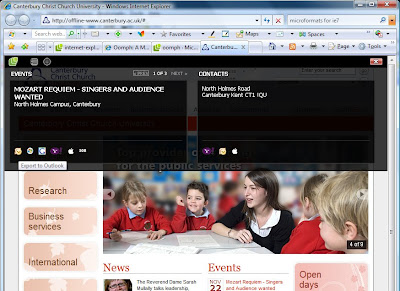
In the above example the "tagged" content is displayed in the list view over the page displaying events and contact details. Both of these can be exported directly into your Outlook, Google, Windows Life, Yahoo and/or Apple Mac calendar.
Below, the "tagged" location content is displayed on a map.
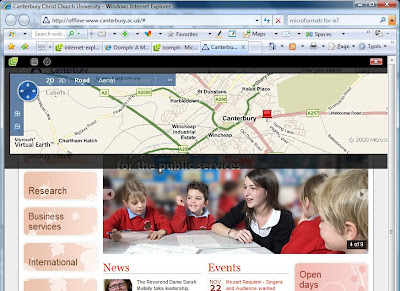
There are other solutions for Firefox and Safari including tools like TailsExport and Operator. These again convert the "tagged" content into structured information with the ability to export to various programmes including Outlook.
If you have any questions regarding Microformats or the WebTeam's implementation of these please leave a comment and we'll respond.
Subscribe to:
Posts (Atom)